PNG to WebP Converter - Reduce the Size of Your Images
One of the most effective ways to improve your site's speed is by optimizing image files. Converting PNG images to WebP format has emerged as a powerful solution for achieving significant file size reduction without compromising image quality.
The featured image of this article was reduced by 94.4% saving 194KB of data using What To WebP
Understanding WebP: The Modern Image Format
WebP, developed by Google in 2010, represents a significant advancement in image compression technology. This format has gained substantial traction, with search volume growing from just 4,000 monthly searches in July 2018 to an impressive 180,000 searches in 2024. This remarkable growth reflects the increasing recognition of WebP's benefits among web developers and content creators.
Why You Should Convert PNG to WebP
The advantages of converting your PNG files to WebP format are compelling. WebP images typically achieve 25-34% smaller file sizes compared to equivalent PNG files, all while maintaining similar visual quality. This reduction in file size translates directly into faster page load times, improved user experience, and better search engine rankings.
Modern browsers have embraced WebP support, with Chrome, Firefox, Edge, and Safari all offering native compatibility. This widespread adoption means you can confidently use WebP images across your websites without worrying about compatibility issues.
Transparency Support: A Common Concern Addressed
One frequent question about WebP conversion is whether it supports transparency, a feature many designers rely on in PNG files. The answer is a resounding yes – WebP fully supports alpha channel transparency, just like PNG. In fact, WebP often achieves better compression ratios for transparent images compared to PNG, making it an excel.
Converting PNG to WebP Using Our Tool
Our conversion tool simplifies the process and makes it efficient. Here’s how you can convert your images:
- Upload your PNG file using our easy drag-and-drop interface.
- Select your desired quality settings (we suggest starting with 80% for a good balance).
- Hit the convert button.
- Download your optimized WebP image.
The whole process takes just seconds, and you can batch convert multiple images at once to save time.
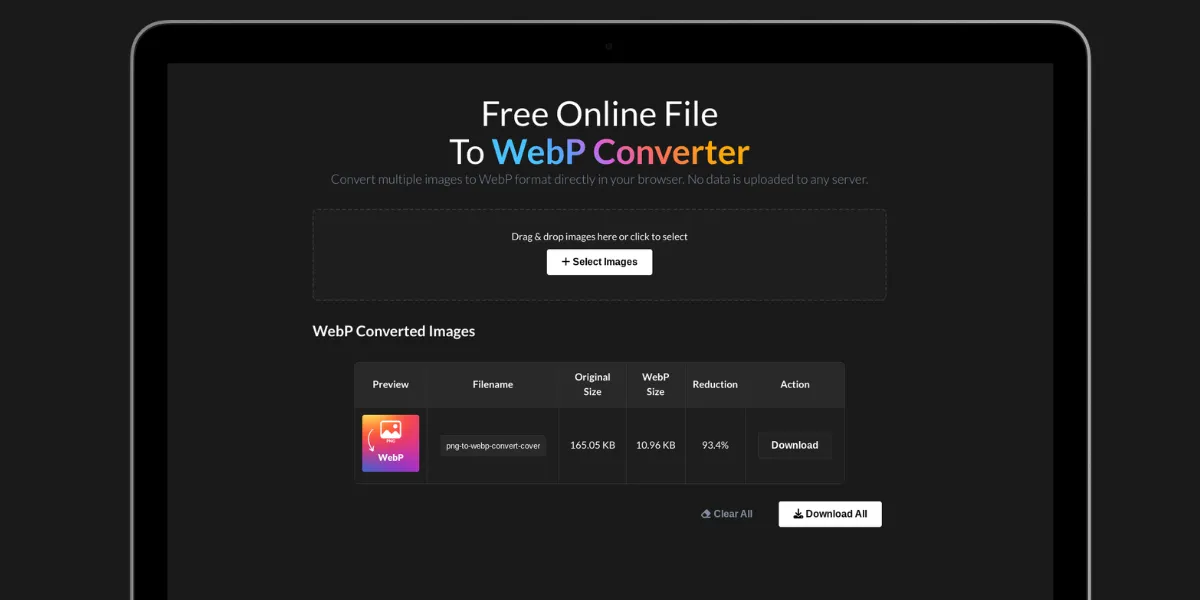
The image above reduced by 83.5% saving 96.72 KB of data when converting a PNG To WEBP format
Free Conversion Options
While our tool provides a convenient solution, we want to be transparent about other options. There are several free methods available for converting PNG to WebP:
Command-line tools like cwebp from Google offer robust conversion capabilities for more technical users. Popular image editing software such as GIMP and Adobe Photoshop also allow WebP export. Additionally, various online tools provide free conversion services, although they may have restrictions on file size or the number of conversions.
Making the Switch to WebP
Converting your PNG images to WebP format is a smart move for enhancing your website's performance. With smaller file sizes, preserved image quality, and increasing support across browsers, WebP stands out as a top choice for contemporary web projects. Whether you're fine-tuning a personal blog or overseeing a large e-commerce platform, the advantages of transitioning to WebP are evident and quantifiable.